A knight looking out across the Lost Kingdom
Dungeon Dash · Friends & treasures

A kingdom worth
sharing.

Bring a friend into the adventure. Their progress can unlock exclusive treasures for your Keep.

A simple invitation. A new adventure.

You send it. They enter it. Then play.

Your in-game username is your invitation code. Keep that code in the message you send—sharing the download link alone does not connect your friend to you.

YOU · STEP 1

Tap Invite Friends. Send the whole message.

On the home screen, tap INVITE FRIENDS. You can also find it in the pause menu. If asked, sign in and choose your username first.
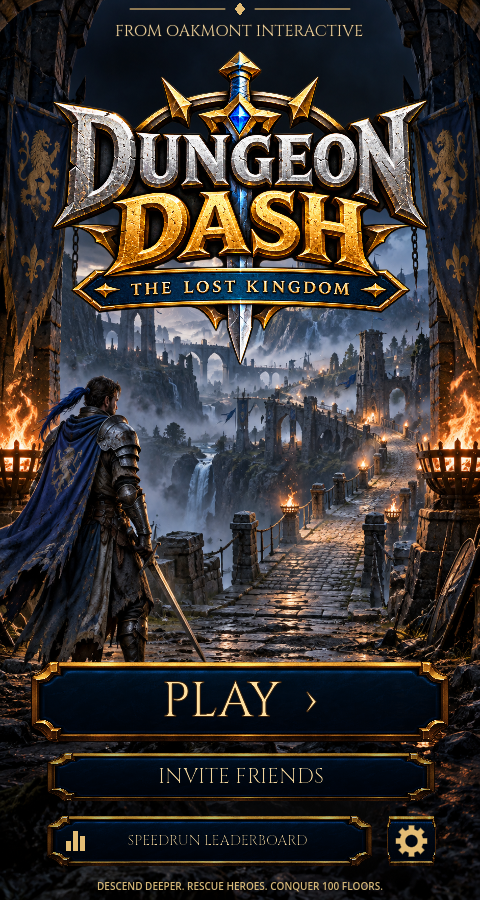
Dungeon Dash home screen with Invite Friends directly below Play
In the game: look just below Play.

Choose WhatsApp or your favourite messaging app

Pick your friend and send the prepared invitation. If the game copies the message instead, open your chat, paste it and send.

Your friendMessaging illustration
Join me in Dungeon Dash: The Lost Kingdom!
https://www.oakmontinteractive.com/dungeon-dash.html

My invitation code:
YOUR_USERNAME

Sign in, choose your username and enter my code when asked who invited you, before your first recorded run. Adventure together and unlock Keep treasures!

Illustration only. The game fills in your real username automatically. Don’t send “YOUR_USERNAME” as the code.

Send both the link and your code.

You can invite as many friends as you like. Each friend uses their own account.

FOR THE FRIEND RECEIVING THE INVITATION

Got an invite? Start here.

Keep your friend’s message handy. You’ll need their invitation code inside the game.

Get Dungeon Dash on Google Play.

Install the public game, then return to your invitation code. No special access or group membership is needed.

Get it on Google Play
YOUR FRIEND · STEP 3

Sign in. Choose your name. Enter their code.

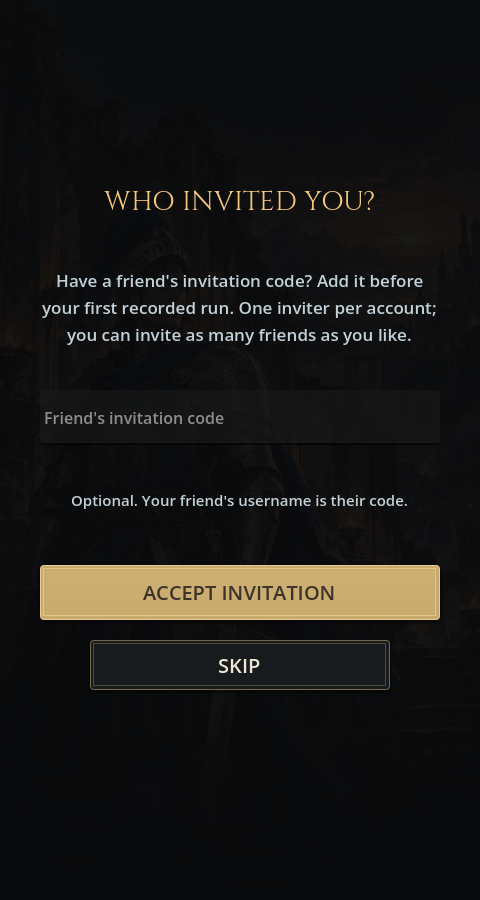
Open the game and select SIGN IN. Choose your own player username. The next screen asks WHO INVITED YOU?

  1. Copy the invitation code from your friend’s message.
  2. Paste it into Friend’s invitation code.
  3. Tap ACCEPT INVITATION, then continue into the game.

Do this before starting your first run. Guest play does not link your progress to a signed-in referral account.

Actual Who invited you screen with invitation code field and Accept Invitation button
In the game: enter the code, then Accept Invitation.
LET THE ADVENTURE BEGIN · STEP 4

Play floors. Grow the collection.

With the invitation accepted, play while signed in and connected so your progress can reach the leaderboard. Your inviter’s Companions’ Collection tracks the reward milestones.

Invite a friendThey accept & playMilestones unlock decor

The first collection milestone is one invited friend clearing Floor 10. Other treasures need higher floors or more friends. Check Friend Rewards at the merchant or in your Keep to see each item’s requirements and your progress.

Sending a message, installing the game alone does not unlock a reward. Each friend’s milestone counts once across all heroes.

A little help along the way

Quick answers

I skipped “Who invited you?” Can I still add the code?

If you have not submitted a recorded run and have not accepted another inviter, open Friend Rewards in your Keep, enter the code and tap ACCEPT. Once a run is recorded, the game will not accept a new referral. Don’t start a run just to reach the merchant first.

I already play. Can I invite new friends?

Yes! Existing players can invite as many new friends as they like. The before-first-run rule applies to the account accepting a code, not the player sending it.

How do I know the invitation was accepted?

Open Friend Rewards. An accepted account shows INVITATION ACCEPTED · YOUR PROGRESS COUNTS. If you see an error when entering a code, correct it before continuing.

The code is not found. What should I check?

Use your friend’s exact in-game username from their invitation—not their email address or Google Group display name. Ask them to sign in and use Invite Friends to send a fresh message.

My friend played, but my treasure has not unlocked.

Check the item’s floor and friend-count requirements. Your friend needs to have accepted your code before their first recorded run and uploaded qualifying progress while signed in. Reconnect and reopen Friend Rewards to refresh the collection.

Can I share this guide with someone?

Absolutely. Send them this guide alongside your in-game invitation. Remember to include your personal code as well.

Still stuck?

Tell us which step you reached and what the screen says.

Contact support →